
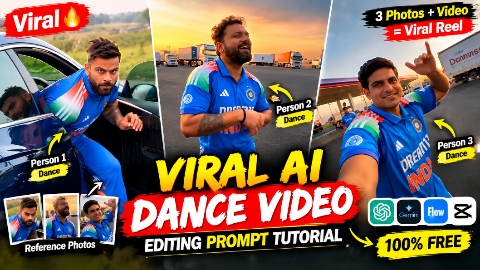
You might have noticed that funny dance Reels featuring three people are currently going viral on Instagram. These videos typically feature you and your friends or even celebrities with everyone’s faces and outfits perfectly replicated. The choreography involves the first person dancing, the second person dancing while holding the camera, and the third person emerging from a car to join the dance. These videos are incredibly entertaining; while the trend didn’t originate in India, it has become hugely popular here, with people creating them rapidly. If you want to make a similar video with your friends or celebrities and upload it to your social media platforms, you can do so easily and completely for free. Let me walk you through the step-by-step process in this article.
Details Of Viral Dance Ai Editing
So friends, if we talk about the details of this viral ‘Honey Dance’ AI video edit, you might have seen that it features three people dancing; each has distinct movements, and the dance looks fantastic. It has become a massive hit on social media, with people eagerly creating their own versions. However, a hurdle for many is that the tools required to create these videos are often high-end and paid, making it difficult for some to get started. But today, I am going to share a free method that allows you to create an identical video with great ease. The process is very simple—you just need a reference video and photos of three friends or celebrities to create it. Let me explain the details and the entire creation process below.
Tips For perfect Photo Selection
So friends, the most important thing for creating this kind of dance video is using a perfect photo of yourself so that the generated video turns out flawlessly. I suggest using a full-body photo of yourself; similarly, for the three photos you upload whether of friends or celebrities using full-body shots yields much better results. This is because the entire image is replicated exactly, ensuring the generated video matches not just your face but your entire body, making it look incredibly realistic. People will love the video because it will be flawless an exact replica of how you actually look. If you use a half-body photo instead, the video won’t generate perfectly; you might think it isn’t working and try again, only to face issues. So, just use a perfect full-body photo right from the start to get the best result. I hope you find these tips helpful go ahead and create your video; I’ve explained the process below.
How To Create Viral Dance Ai Video
The video of such dance is very viral, so it is also very easy to make it, absolutely free. Let me tell you some steps below, follow it carefully, you can make it in a very easy way.
- First of all, you have to click on create video.
- And copy the reference video and prompt.
- Then you have to upload the photos of your 3 people and the reference video given by me in Gemini AI and also paste the prompt.
- And your video is Redy now You can Download it
What Is The Gemini Ai :-
So friends, what is Gemini, let us tell you about it. Gemini is a video generating application and website, which is a video model of Google, with the help of which you can generate any type of video or you can give any reference video and give a correct prompt to it, with the help of which you can generate the same type of video or if you give the text there, you can also make text to video and in GPT AI you can also generate your photo with just one prompt or if you upload an image, write the prompt there which you want to do from the prompt, in the image, it will also generate a realistic type of video for you, whatever type of video you can generate, that video will also be created within just 10 seconds, which is very helpful because it is free and people use it a lot these days.
How To Use Gemini Ai Free
You might have seen on Instagram that such videos are going viral a lot right now, which are dance videos, but you don’t find any free method to create them for free. So, what is the free method to create them? Let me tell you. For this, you can use the Gemini I app, which is free to you. You need to generate about four videos daily, which is not free, but you can claim it through the MyJio app. If you have a Jio SIM with a 349 rupee recharge, open the MyJio app and there is a banner at the top; click on Claim Gemini I, then enter your email, and your Gemini I Pro subscription will be activated on your Gmail. This will allow you to create such videos completely for free. If you create this video using Flow AI instead of Gemini AI, you can also use Flow AI, but you might not get the same result because Gemini AI creates it step by step, while Flow AI does not. So, you can try Flow AI; you will get the credit already there without doing anything. This will allow you to generate about four videos there as well.
Conclusion
So friends, in today’s video, I’ve explained the entire process of editing these fun AI dance videos. I’ve also provided the prompts and reference videos needed to create them, walking you through every step in detail so you can make these trending AI dance videos for free. I’ve covered exactly how to do it. I hope you’ve understood everything; if so, go ahead and create these videos to upload to your social media platforms—your Reels could go viral too.
Siddharth Nagar ke Rahane Wale Hain kathela Chauraha Tola Jhanda Nagar