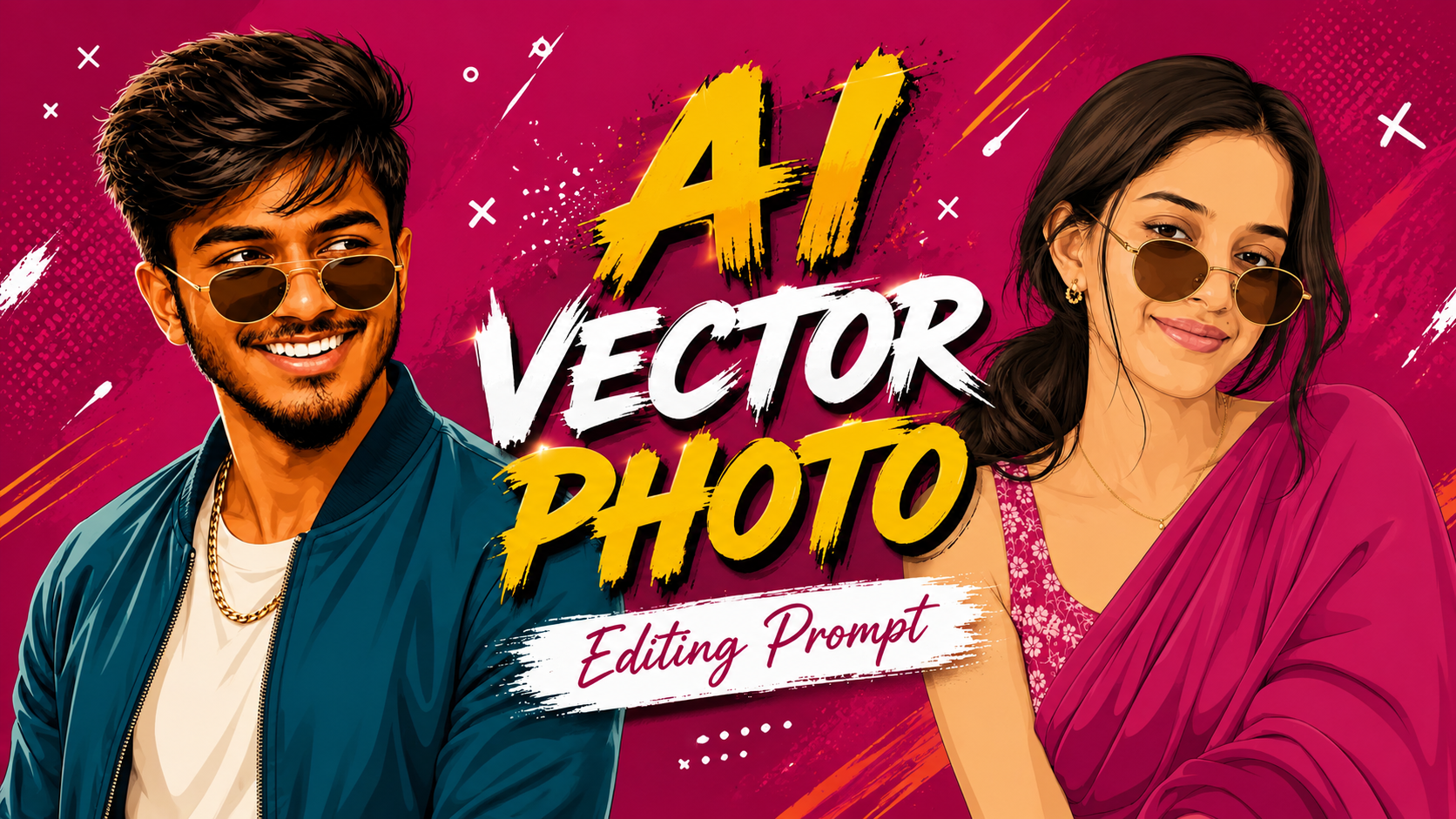
Nowadays with the help of AI photo editing, you can convert any of your normal photos into some type of AI vector photo edit by just following a simple prompt given by me. Without any editing application or any tool, you can add such natural and high quality painting to your photo in just one prompt. Q And in this post, we will tell you what AI vector photo editing is, what is its use, and what is the correct prompt to use it. With the help of this prompt, you can add background, cinematic look, pose, glasses and even locket to your photo and we will try our best to match your face 100%. And for this, we will give you a separate heading below and explain to you in detail how to slow down the face change problem, that too permanently.
What is an AI Photo Editing Prompt ?
A photo editing prompt is an instruction that AI image generation or AI tool is given such as Like what should the lighting be like, what should the backround be like, what should the camera angle be, should the photo be realistic or AI, should the face match or not. How much your face should match your photo aud us photo ki aspect ratio kya ho kyuki aap au ko jetna ache se samja doge utna kam apke liye asan ho jayega
What result will this prompt yield ?
With my prompt, your simple selfie photo will be converted into HD quality with AI vector model + pose and many changes will be made in it like completely different background, completely different pose. Look completely different outfit completely different, you will get to see many such changes and remember one thing, on using the prompt on different tools, you will be You will get a different results 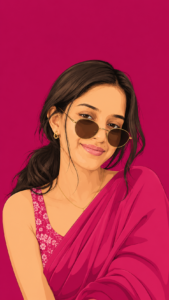
Create this as a 9:16 vertical portrait image. Using the attached reference photo, recreate the person’s face with high precision exact facial structure, eyes, nose, lips, and skin tone matching the reference photo closely, side-profile or three-quarter angle as shown. Style: bold flat vector illustration, clean smooth linework, minimal shading, poster-art aesthetic no painterly texture, crisp digital vector finish. Pose: head turned slightly to the side in a relaxed three-quarter profile, one shoulder forward, subtle confident expression, hair styled in soft loose waves pulled into a low ponytail with a few face-framing strands. Outfit: elegant traditional saree in a single bold monochrome color family (deep teal, burnt orange, or rich magenta – pick one saturated tone), with a delicate floral-print blouse in a contrasting lighter shade of the same color family, small dainty flower-shaped stud earring, thin gold chain necklace, round vintage-style sunglasses pushed slightly down the nose. Background: solid bold monochrome color matching the outfit’s color family, completely flat with no texture or gradient, high contrast, poster-style minimalism. Composition: subject positioned in the lower two-thirds of the frame with headroom above, generous negative space around the head, fully filling the 9:16 vertical frame, clean poster-quality layout. Style: flat vector illustration, bold saturated color palette, minimal linework, high-fashion editorial poster quality, confident and stylish mood.
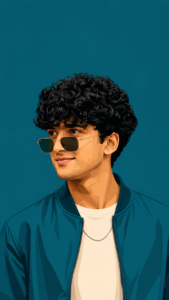
Create this as a 9:16 vertical portrait image.Using the attached reference photo, recreate the person’s face with high precision – exact facial structure, eyes, nose, lips, jawline, beard/facial hair (if any), and skin tone matching the reference photo closely, side profile or three-quarter angle as shown. Style: bold flat vector illustration, clean smooth linework, minimal shading, poster-art aesthetic – no painterly texture, crisp digital vector finish. Pose: head turned slightly to the side in a relaxed three-quarter profile, one shoulder forward, warm charming smile – natural, confident, slightly playful, eyes gently engaged. Hair styled neatly matching the reference (textured, swept back, or tousled as shown). Outfit: sharp casual-formal look – a solid-color bomber jacket or structured shirt in a single bold monochrome tone (deep teal, burnt orange, or charcoal-pick one saturated color), plain fitted t-shirt or collared shirt underneath in a lighter contrasting shade, minimal accessories (thin chain necklace or wristwatch), round or square vintage-style sunglasses pushed slightly down the nose. Background: solid bold monochrome color matching the outfit’s color family, completely flat with no texture or gradient, high contrast, poster-style minimalism. Composition: subject positioned in the lower two-thirds of the frame with headroom above, generous negative space around the head, fully filling the 9:16 vertical frame, clean poster-quality layout. Style: flat vector illustration, bold saturated color palette, minimal linework, high-fashion editorial poster quality, confident, charming, and stylish mood.
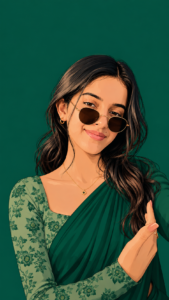
Create this as a 9:16 vertical portrait image. Using the attached reference photo, recreate the person’s face with high precision -exact facial structure, eyes, nose,lips, and skin tone matching the reference photo closely, side profile or three-quarter angle as shown. Style: bold flat vector illustration, clean smooth linework, minimal shading, poster-art aesthetic – no painterly texture, crisp digital vector finish. Pose: head turned slightly to the side in a relaxed three-quarter profile, one shoulder forward, subtle confident expression, hair styled in soft loose waves pulled into a low ponytail with a few face-framing strands. Outfit: elegant traditional saree in a single bold monochrome color family (deep teal, burnt orange, or rich magenta – pick one saturated tone), with a delicate floral-print blouse in a contrasting lighter shade of the same color family, small dainty flower-shaped stud earring, thin gold chain necklace, round vintage-style sunglasses pushed slightly down the nose. 2,369 Background: solid bold monochrome color matching the outfit’s color family, completely flat with no texture or gradient, high contrast, poster-style minimalism. Composition: subject positioned in the lower two-thirds of the frame with headroom above, generous negative space around the head, fully filling the 9:16 vertical frame, clean poster-quality layout. 103 Style: flat vector illustration, bold saturated color palette, minimal linework, high-fashion editorial poster quality, confident and stylish mood.don’t change the face
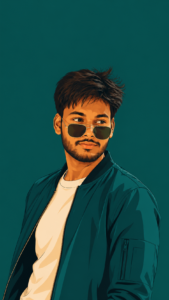
Create this as a 9:16 vertical portrait image. Using the attached reference photo, recreate the person’s face with high precision – exact facial structure, eyes, nose, lips, jawline, beard/facial hair (if any), and skin tone matching the reference photo closely, side-profile or three-quarter angle as shown. Style: bold flat vector illustration, clean smooth linework, minimal shading, poster-art aesthetic – no painterly texture, crisp digital vector finish. Pose: head turned slightly to the side in a relaxed three-quarter profile, one shoulder forward, warm charming smile – natural, confident, slightly playful, eyes gently engaged. Hair styled neatly matching the reference (textured, swept back, or tousled as shown). Outfit: sharp casual-formal look – a solid-color bomber jacket or structured shirt in a single bold monochrome tone (deep teal, burnt orange, or charcoal – pick one saturated color), plain fitted t-shirt or collared shirt underneath in a lighter contrasting shade, minimal accessories (thin chain necklace or wristwatch), round or square vintage-style sunglasses pushed slightly down the nose. Background: solid bold monochrome color matching the outfit’s color family, completely flat with no texture or gradient, high contrast, poster-style minimalism. Composition: subject positioned in the lower two-thirds of the frame with headroom above, generous negative space around the head, fully filling the 9:16 vertical frame, clean poster-quality layout. Style: flat vector illustration, bold saturated color palette, minimal linework, high-fashion editorial poster quality, confident, charming, and stylish mood.
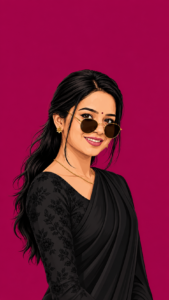
Using the attached reference photo, recreate the person's face with high precision - exact facial structure, eyes, nose, lips, and skin tone matching the reference photo closely, side-profile or three-quarter angle as shown. Style: bold flat vector illustration, clean smooth linework, minimal shading, poster-art aesthetic - no painterly texture, crisp digital vector finish Pose: head turned slightly to the side in a relaxed three-quarter profile, one shoulder forward, subtle confident expression, hair styled in soft loose waves pulled into a low ponytail with a few face-framing strands. Outfit: elegant traditional saree in a single bold monochrome color family (deep teal, burnt orange, or rich magenta - pick one saturated tone), with a delicate floral-print blouse in a contrasting lighter shade of the same color family, small dainty flower-shaped stud earring, thin gold chain necklace, round vintage-style sunglasses pushed slightly down the nose. 2,369 Background: solid bold monochrome color matching the outfit's color family, completely flat with no texture or gradient, high contrast, poster-style minimalism. Composition: subject positioned in the lower two-thirds of the frame with headroom above, generous negative space around the head, fully filling the 9:16 vertical frame, clean poster-quality layout. 103 Style: flat vector illustration, bold saturated color palette, minimal linework, high-fashion editorial poster quality, confident and stylish mood.don't change the face
How to Create Image ?
Now I will tell you some steps by following which you can make such a vector photo, just follow the steps.
- First of all you have to copy the prompt given by me, click on the copy button.
- Now you can click on the create image page And open Chatgpt from Playstore
- Now you have to add any simple photo of yours and send it by quick pasting.
- Aur kuch hi secondo me apki image ready ab apko ose download kar lena hai
What is Chatgpt :-
Chatgpt is a very helpful app besides being an editing application. You can create prompts and generate images using the prompts.And if you are creating a channel or Instagram ID, you can take tips from Chatgpt or if you are starting a business, you can take help from Chatgpt. Esme apko a to z jankari photo generate prompts generarte thumbnail create jaise bhot sare kam karta hai. Esme provides you with a to z information, photo generation prompts, thumbnail creation, and many other things. I will give you this AI vector photo in just 2 minutes if you follow my steps then And this application will not change your face, it will create your exact photo as you want.
How to face Change Problem Solved ?
If your face changes then the best solution is when you add a photo from your gallery to create such a vector image in Chatgpt. Because the added photo itself is the most important thing, whether it is a chat or an AI tool, unless it detects your face correctly, it will not create a perfect image.Whenever you add a photo, add one in which your face is clearly visible. And by doing this your face will not change no matter what AI tool you use. I hope you have understood how to solve your face change problem.
FAQ
1. Can this prompt be used on mobile ?
Yes, you can use this prompt in your Android phone or iPhone very easily and absolutely free.
2. Will the face in my photo remain exactly the same ?
Your face will definitely match the AI vector photo. If you follow the steps I told you above, your face will match.
3. Can 9:16 be used for Instagram/Reels ?
Of course, you can make your photo in any size today, not just 9:16 size. You just have to write your size at the end of the prompt and your photo will be made as per your requirement.
4. Will this prompt work with free AI tools as well?
This thing depends on the tool. ChatGP Gemini will do it very easily and will create a perfect image.
Conclusion :-
I have given complete details about AI vector photo editing, if you want to know how to create an image with prompt, what is prompt, what is ChatGP I have told you all this, just read the article carefully and understand it. If you have any doubt, you can ask through social platform by messaging on duo_manglesh ID on Instagram. Thank You